
A Utlility.dwl is located in a Mule project at src/main/resources/modules. The Utility.dwl file defines a function named encryptString that encrypts a String What is the correct DataWeave to call the encryptString function in a Transform Message component?
A. 1. %dw 2.0
2. output application/json
3. import modules::Utility
4. ---
5. Utility::encryptString( "John Smith" )
B. 1. %dw 2.0
2. output application/json
3. import modules::Utility
4. ---
5. encryptString( "John Smith" )
C. 1. %dw 2.0
2. output application/json
3. import modules.Utility
4. ---
5. encryptString( "John Smith" )
D. 1. %dw 2.0
2. output application/json
3. import modules.Utility
4. ---
5. Utility.encryptString( "John Smith" )
Explanation:
Correct answer is
%dw 2.0
output application/json
import modules::Utility
---
Utility::encryptString( "John Smith" )
DataWeave 2.0 functions are packaged in modules. Before you begin, note that
DataWeave 2.0 is for Mule 4 apps. For Mule 3 apps, refer to DataWeave Operators in the
Mule 3.9 documentation. For other Mule versions, you can use the version selector for the
Mule Runtime table of contents.
Functions in the Core (dw::Core) module are imported automatically into your DataWeave
scripts. To use other modules, you need to import the module or functions you want to use
by adding the import directive to the head of your DataWeave script, for example:
import dw::core::Strings
import camelize, capitalize from dw::core::Strings
import * from dw::core::Strings
The way you import a module impacts the way you need to call its functions from a
DataWeave script. If the directive does not list specific functions to import or use * from to
import all functions from a function module, you need to specify the module when you call
the function from your script. For example, this import directive does not identify any
functions to import from the String module, so it calls the pluralize function like this:
Strings::pluralize("box").
Transform
%dw 2.0
import dw::core::Strings
output application/json
---
{ 'plural': Strings::pluralize("box") }
Refer to the exhibits.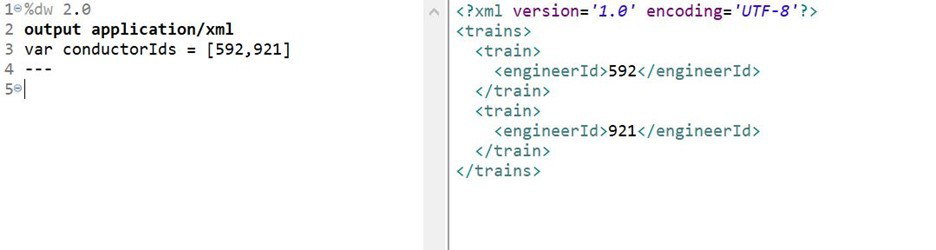
What DataWeave expression transforms the conductorIds array to the XML output?
A. 1. 1. trains:
2. 2. conductorIds map ((engId, index) ->
3. 3. train: {
4. 4. engineerId: engId
5. 5. }
6. 6. )
B. 1. 1. { trains:
2. 2.
3. 3. conductorIds map ((engId, index) ->
4. 4. train: {
5. 5. engineerId: engId
6. 6. }
7. 7. )
8. 8. }
C. 1. 1. trains:
2. 2. {(
3. 3. conductorIds map ((engId, index) ->
4. 4. train: {
5. 5. engineerId: engId
6. 6. }
7. 7. )
8. 8. )}
D. 1. 1. {( trains:
2. 2.
3. 3. conductorIds map ((engId, index) ->
4. 4. train: {
5. 5. engineerId: engId
6. 6. }
7. 7. )
8. 8. )}
Explanation:
Points to remember:
* XML must have a root element.
* XML only allows one root element
* To avoid multiple root issues, you must create a root element for the XML output,
whenever we transform output
* When mapping array elements (JSON or JAVA) to XML, wrap the map operations in {(..)}
-{ } are defining the object
( ) are transforming each element in the array as a key/value pair
* The transformation to XML would fail if the above mentioned considerations were not
taken into account.
* Thus the transformation script declares a root element as trains and wraps the data in “{(
)}“.
Whenever you see such type of question, always look out for root element followed by {( )}
wrapping map.
I call this a "Wrap The Map" scenario. Hope it would help you remember !
Refer to the exhibits.
The<when> expression for the Choice router needs to be written.
What is a valid <when> expression to route Mule events to the non-default flow?
A.
#['MuleSoft' == paytoad.company]
B.
#[ company = "MuleSoft" ]
C.
#[ if( company = "MuleSoft") ]
D.
#[ if('MuleSoff == payload.company) ]
#['MuleSoft' == paytoad.company]
Refer to the exhibit
A.
Option A
B.
Option B
C.
Option C
D.
Option D
Option A
What is the correct syntax todefine and call a function in Database? 
A.
Option A
B.
Option B
C.
Option C
D.
Option D
Option A
Where would you create SLA Tiers for an API?
A. Exchange
B. API Manager
C. Anypoint Studio
D. In RAML specifications
Explanation:
MuleSoft Doc Ref : https://docs.mulesoft.com/api-manager/2.x/policy-mule3-tutorialmanage-
an-api#to-add-the-tier
Steps to create SLA Tier are as follows:
1) In API Manager, in API Administration, click a version.
2) Check that the API supports resource-level policies: On the API version details page, in
Status, click Configure Endpoint, and check that Type is RAML.
3) Choose the SLA Tiers, and click Add SLA Tier. Set up limit on SLA tier.
Explanation: Correct answer is {customerID}.
A. var toUpper(userName) -> upper(userName)
B. fun toUpper(userName) = upper(userName)
C. fun toUpper(userName) -> upper(userName)
D. var toUpper(userName) = upper(userName)
A function named toUpper needs to be defined that accepts a string named userName and
returns the string in uppercase.
What is the correct DW code to define the toUpper function?
Refer to the exhibit. 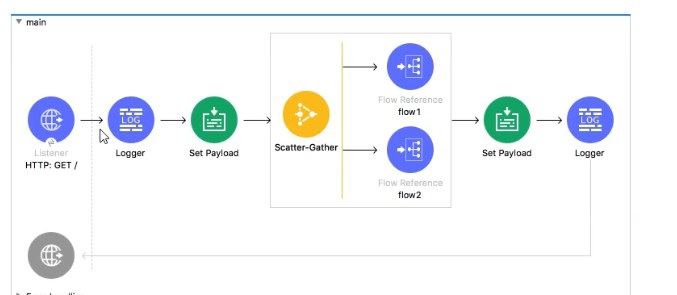
In the execution of the Scatter_Gather, the flow1 route completes after 10 seconds and the
flow2 route completes after 20 seconds.
How many seconds does it take for the Scatter_Gather to complete?
A.
0
B.
10
C.
20
D.
30
20
| Page 3 out of 29 Pages |
| Mulesoft MCD-Level-1 Exam Questions Home | Previous |

Contact Us - Privacy Policy ... Copyright © - All Rights Reserved